When it comes to project management, few tools have earned the level of recognition and loyalty that Trello has. For over a decade, Trello has been the go-to app for individuals, freelancers, small businesses, and teams who want a simple, visual way to organize tasks and stay productive. But with newer competitors like Notion, ClickUp, Asana, Monday.com, and even AI-powered workspace tools entering the market, is Trello still a strong choice in 2025?
The short answer? Yes — Trello remains one of the easiest, most intuitive, and most lightweight productivity tools available.
But the long answer is worth exploring, because Trello has evolved far beyond the “simple Kanban board” it used to be.
This review takes a deep dive into Trello’s 2025 version — its features, strengths, weaknesses, pricing, new updates, and who it’s best for.
What Is Trello, Really?
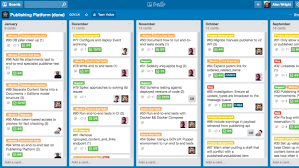
Trello is a visual project-management platform designed around the concept of Kanban boards — a productivity system where tasks move across stages like:
- To Do
- Doing
- Done
Of course, Trello has grown way beyond this basic setup.
Today, it supports:
- Workflows
- Automations
- Calendars
- Dashboards
- Team collaboration
- Power-ups (extra features)
- Templates
- AI-assisted organization
Its strength lies in its simplicity. Anyone can learn Trello in minutes.
What’s New in Trello 2025?
Trello has released several powerful updates that make it far more competitive in today’s crowded productivity market.
✔ Trello AI Assist
A major upgrade. Trello AI can now:
- Organize messy boards automatically
- Suggest due dates
- Prioritize tasks
- Summarize a full board
- Generate checklists
- Predict bottlenecks
- Auto-tag tasks based on content
This is perfect for people managing complex projects or content calendars.
✔ Improved Workspace View
Trello now allows you to see all boards, tasks, and team progress in one unified dashboard. This is especially helpful for teams managing multiple projects at once.
✔ Automation Upgrades (Butler 2.0)
Trello’s built-in automation tool, Butler, now includes:
- More triggers
- Stronger logic
- AI-generated automation recommendations
- Better integrations with Google Workspace & Slack
You can automate things like:
- Move tasks when completed
- Assign cards to team members
- Trigger notifications
- Auto-update card statuses
✔ Performance Improvements
The new Trello loads faster:
- Faster board opening
- Smoother drag-and-drop
- Quicker syncing
- Better mobile experience
This is important because Trello is known for being lightweight — and it remains that way.
✔ Enhanced Power-Ups
Power-ups now include hundreds of integrations:
- Google Drive
- Notion
- Jira
- Slack
- Dropbox
- Zoom
- Calendars
- GitHub
- MailChimp
You can turn Trello into a full business or team management tool with the right power-ups.
Key Features of Trello (2025 Edition)
1. Kanban Boards
Trello’s core feature.
You create lists and move task cards from one list to another.
Perfect for:
- Personal planning
- Content creators
- Teams managing workflow
- Software teams
- Marketing teams
- Event planning
Simple but effective.
2. Cards and Checklists
Cards are where the details live.
A card can contain:
- Descriptions
- Checklists
- Attachments
- Subtasks
- Due dates
- Labels
- Comments
- Automation rules
You can turn a simple card into a full mini project.
3. Calendar and Timeline Views
Great for managing:
- Blog schedules
- Team deadlines
- Campaigns
- Client projects
Timeline view makes Trello a stronger competitor to tools like Asana and Monday.com.
4. Trello AI
AI now helps with:
- Writing task descriptions
- Creating workflows
- Suggesting task organization
- Prioritizing tasks
AI makes Trello much easier for beginners.
5. Collaboration Tools
Teams can:
- Comment on cards
- Assign tasks
- Attach documents
- Share boards
- Vote on ideas
- Track progress
It has real-time syncing and works great for remote teams.
6. Automation (Butler)
This is one of Trello’s most powerful features.
You can automate repetitive tasks like:
- Moving cards
- Tagging cards
- Setting reminders
- Triggering messages
- Updating due dates
Automation saves time and reduces errors.
Pros of Trello
✔ Extremely easy to learn
Anyone can understand Trello in minutes — no training needed.
✔ Lightweight and fast
Unlike bulkier tools (ClickUp, Monday.com), Trello is simple and quick.
✔ Highly visual and customizable
Perfect for people who prefer visual organization.
✔ Strong free plan
One of the best free productivity tools available.
✔ Great for personal AND team use
It works for both individual planning and workplace collaboration.
✔ Huge number of templates
You can find templates for:
- Social media planners
- Content calendars
- Personal budgets
- Project management
- CRM
- HR onboarding
✔ Integrations with almost everything
This makes Trello extremely flexible.
Cons of Trello
✘ Not ideal for very large, complex teams
Enterprise-level teams may need deeper tools like Jira or ClickUp.
✘ Can become cluttered
If you don’t organize your boards well, they can get messy fast.
✘ Limited built-in reporting
Trello is improving, but still weaker than Asana or Monday.com in analytics.
✘ Advanced features require power-ups
And some power-ups cost extra.
Trello Pricing (2025)
Trello is still affordable:
- Free Plan — Great for individuals
- Standard Plan ($5/user/month) — Unlimited boards + more features
- Premium Plan ($10/user/month) — Timeline, calendars, dashboards
- Enterprise Plan — Stronger admin and security features
For most people, the free or premium plan is enough.
Who Should Use Trello in 2025?
✔ Students
For assignments, deadlines, and studying.
✔ Content creators
Great for planning content calendars and posting schedules.
✔ Freelancers
For managing client work and deadlines.
✔ Small businesses
For organizing tasks and team projects.
✔ Marketing teams
Campaign planning becomes easy.
✔ Remote teams
Perfect for workflow visibility.
✔ Personal productivity
Use Trello as a:
- Daily planner
- Habit tracker
- Goal-setting board
- Meal planner
- Financial tracker
Is Trello Still Worth Using in 2025?
Absolutely.
Even with many new tools on the market, Trello remains:
- Easy
- Fast
- Flexible
- Reliable
- Great for beginners
- Strong enough for teams
- Enhanced by AI
- Affordable
If you want a productivity tool that doesn’t overwhelm you with complexity, Trello is still one of the best choices today.
Final Verdict
Trello’s strength has always been its simplicity — and that hasn’t changed. What has changed is how powerful Trello has become, thanks to AI updates, improved performance, better automation, and stronger collaboration features.
In 2025, Trello stands out as:
- The easiest project-management tool
- One of the most flexible platforms
- A top choice for personal organization
- A reliable option for small and medium teams
- An affordable solution with strong AI features
If you want a clean, visual, customizable, and stress-free way to manage your tasks or team projects, Trello remains one of the best productivity tools available.