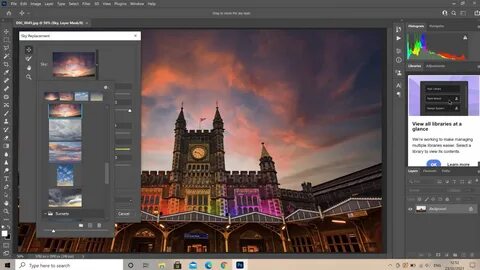
If you use Photoshop — whether for photo editing, graphic design, digital art or content creation — then the November 2025 update may be one of the most important ones in recent times. In version 27.1, Photoshop brings performance improvements, smoother workflows, and fixes that affect everyday editing. Adobe Help Centre
Here’s a detailed breakdown of what changed, why it’s important, and how this update stacks up in 2025’s creative-software landscape.
🆕 What’s New in Photoshop 27.1 (Nov 2025)
Improved Performance & Smoothness
- Photoshop now handles scratch disk management better — the update includes updated free‑space recommendations and optimized internal settings. This means fewer slowdowns during heavy editing, particularly when working with large files or many layers. Adobe Help Centre
- Basic operations like transforms, text edits, layer blend‑modes, brushing and sliders react more instantly — addressing a long-time pain point where lag or hiccups slowed down creative flow. Adobe Help Centre
Bug Fixes That Improve Stability
The update resolves several annoying bugs, including:
- “Generate Image” and “Import Image” options — previously sometimes missing depending on settings — are now reliably visible in the marquee/drawing tool options bar. Adobe Help Centre
- A bug that caused “Select People” to hang when used as part of an Action has been fixed. That means if you use automated workflows (e.g. batch edits, macros), they should now run more reliably. Adobe Help Centre
These fixes may seem small, but for professionals — photographers with ongoing projects, designers doing repetitive tasks, or content creators with tight schedules — they add up to a smoother, more stable editing environment.
Why This Update Matters (2025 Edition)
1. Rising Demand for Performance & Stability
In 2025, many creators work across multiple devices, collaborate with others, and expect software to keep up with high‑resolution media (4K video frames, large PSDs, complex compositions). Performance hiccups or lag can break flow, cause missed deadlines, or even lead to data loss. By improving scratch‑disk management and responsiveness, Photoshop 27.1 helps meet these modern demands.
2. Efficiency for Professionals and Beginners Alike
Whether you’re a pro retoucher, a freelance graphic artist, or a beginner just starting out — the update improves the core experience. Quick response times, reliable tools, and fewer bugs mean less time wasted on troubleshooting and more time creating. For those using Actions or automated edits, stability improvements are especially welcome.
3. Keeps Photoshop Competitive in 2025’s Creative Software Landscape
With many new tools (often AI‑powered, cloud‑based, or mobile‑first) emerging, legacy desktop tools like Photoshop must evolve or risk being left behind. By continuously refining performance and fixing bugs, Adobe keeps Photoshop relevant — especially for creators who need precision, control, and compatibility with legacy projects.
Moreover, recent broader updates to Adobe’s suite also hint at a future where “AI‑assisted” workflows and cross‑device editing become smoother, making Photoshop a versatile choice for both traditional and modern creators. Adobe Newsroom+1
What It Means for Different Kinds of Users
| User Type | Benefit from 27.1 Update |
|---|---|
| Professional photographers / retouchers | Smoother editing of large, high‑resolution files; fewer lags when working with many layers or masks. |
| Graphic designers / illustrators | Faster layer manipulations, stable tools for repeat design tasks, fewer unexpected freezes or crashes. |
| Content creators / social media editors | Reliable export, smoother video-frame editing, less waiting time — ideal for tight schedules. |
| Amateur users / hobbyists | Improved performance even on mid-range hardware; fewer bugs for simpler edits; easier learning curve. |
| Collaborators and teams | More consistent results when working with shared projects; fewer file‑corruption cases, smoother shared workflows. |
Some Things to Check After You Update
- Make sure your scratch‑disk settings are optimized — after the update, you may need to reconfigure where Photoshop stores temporary data (especially if you work with large files).
- If you rely on Actions or automated workflows, test them thoroughly to ensure bugs fixed by 27.1 don’t cause unexpected behavior in your older scripts.
- Consider updating any linked plugins or assets — because core behavior changed, some legacy plugins might need re‑installation or updates.
- Save frequently, especially when handling big projects; while performance improved, it’s always safe to have backups.

How Photoshop 27.1 Compares to Other Recent Software Updates
In 2025, many creative and productivity tools are racing to integrate AI, cloud‑workflow, and cross‑device collaboration. For example, Adobe’s wider Creative Cloud updates now emphasize AI agents and generative features to help creators automate repetitive tasks or explore creative directions more easily. Adobe Newsroom+1
But while some tools may trade depth for convenience, Photoshop remains strong because of this update: it balances reliability, performance, and creative control. For users who want precision, legacy compatibility, and flexibility — not just “easy filters” — 27.1 keeps Photoshop competitive and future‑proof.
Final Thoughts — Is It Time to Update?
If you use Photoshop regularly — whether for design, photography, or digital creativity — then yes, updating to 27.1 makes a lot of sense. The improvements in performance, stability, and workflow responsiveness alone make it worth it.
For casual users, this update doesn’t introduce new flashy features — but that’s exactly why it’s valuable: it improves what you already do every day. And for professionals, stability and speed are often more important than gimmicks.
In a creative ecosystem flooded with new tools, Photoshop’s latest update demonstrates that mature, legacy software still has relevance — when it adapts, optimizes, and keeps creators’ needs at heart.
If you run a blog or site about software, this update makes a great article — because many readers likely use Photoshop, and want to know whether updating is worth it.